
6 music-making apps for 2026: with and without generative AI
Published · Updated
GarageBand, BandLab, Demo, Suno, Udio and Zoundroom compared by AI use, free plan, price and platform, with the best pick with no AI, on iPhone and on Android.
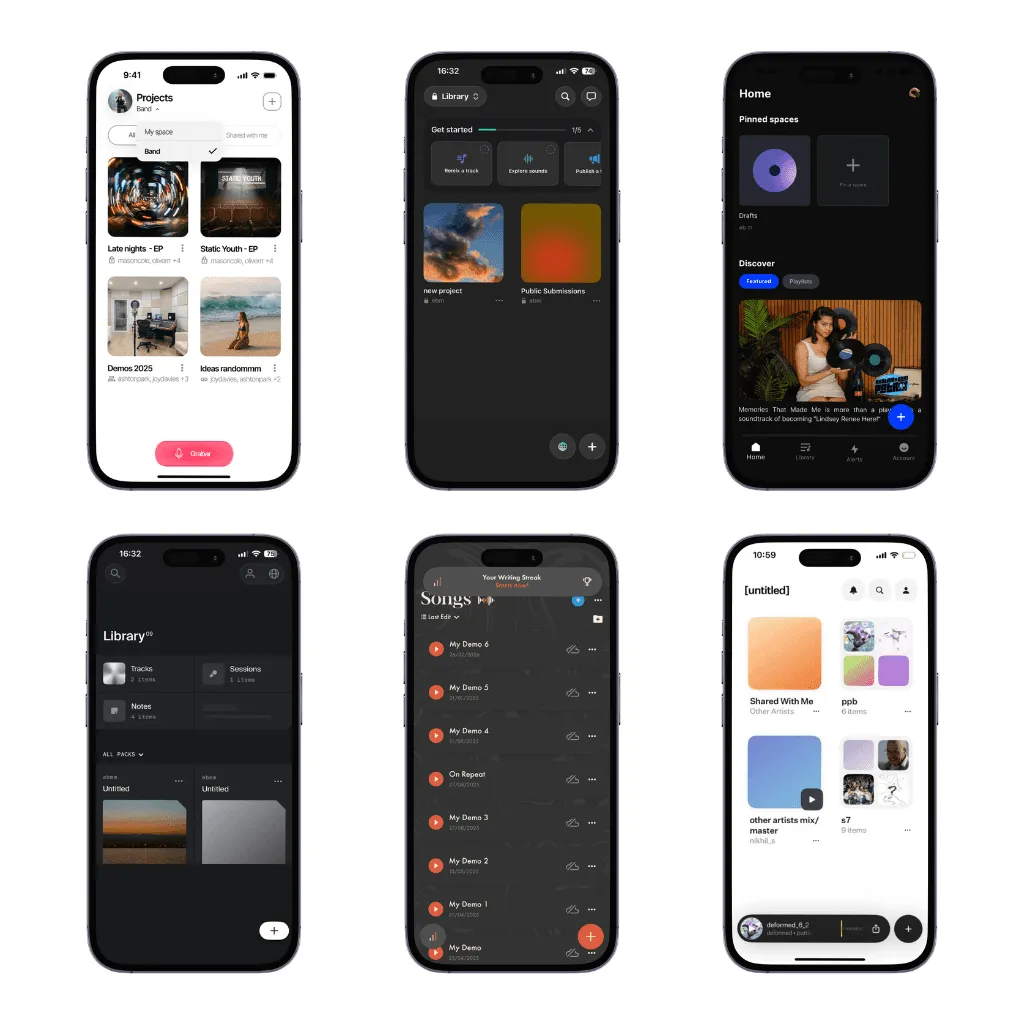
The best free app to make music in 2026 is GarageBand on iPhone, iPad and Mac, and BandLab on Android, iPhone and the web: both are full studios for recording, beats and mixing at no cost. To write songs with lyrics, Zoundroom records each take inside the lyric’s note, suggests rhymes as you write and plays the chords you put over the words. To write over chords the app plays for you, choose Demo on Apple devices. For loops and beats, BandLab’s free Sampler, Drum Machine and Looper, or GarageBand’s Live Loops. To generate a full song from a prompt, Suno; Udio only if you are happy to keep the results inside Udio. For sheet music, none of the six: MuseScore Studio is free on desktop.
Looking for a music maker with no AI? GarageBand and Demo have no generative AI, and BandLab and Zoundroom work fully without their AI tools.
Which app to choose, depending on how you make music
Best app for writing songs with lyrics
Zoundroom if you sing your ideas: write the lyric in a note and record the melody right under the line it belongs to, on iPhone, Android and the web. On your phone and in the browser, rhymes also come up as you write, and the chords you already play sit over the lyric; in the phone app, they also play. Demo if you want the app to play chords under you while you write, with a rhyme tool, on Apple devices. The lyric writing apps comparison looks at rhyme and syllable tools, and the guide on how to write a song takes you from idea to finished draft.
Best free app to make music
BandLab if you want everything on any device: a 16-track studio, beat tools and free SongStarter ideas on Android, iPhone and the web. GarageBand if you use Apple devices: it is completely free, with no paid tier. Two free browser tools need no account: the chord progression player loops a progression you can sing over and record, and the chord sheet maker turns your lyric and chords into a sheet you can transpose and print.
Best music maker without AI
GarageBand for production and Demo for writing over chords: neither generates music with AI. Zoundroom works fully without AI too: record the melody inside the lyric’s note and keep every take next to its words. Auralis, its writing assistant, only suggests text when you ask for it.
Best app on iPhone
Zoundroom to write the lyric with each take recorded under its line (songwriting app for iPhone), Demo to write over chords and GarageBand to produce. The iPhone music apps comparison covers recording apps in more depth.
Best app on Android
BandLab to record and produce, because GarageBand and Demo are not on Android. Zoundroom to write lyrics with the melody recorded right inside them (songwriting app for Android), with the same project in the browser. The Android songwriting apps guide has more options by task. Suno has an Android app; Udio does not.
Best app for beginners
Demo if you do not play an instrument: it plays the chords, so you can sing from the first minute. GarageBand if you have an Apple device and want to learn production; the Mac version includes lessons. For the songwriting itself, the free songwriting course gives you ten lessons with audio and tools.
Best app for beatmaking
BandLab: a free Sampler, Drum Machine and Looper plus weekly free beats, on every platform. On iPhone and iPad, GarageBand’s Beat Sequencer and Live Loops do the same job for free. The best beat maker apps guide adds sampler and pattern apps such as Koala Sampler and FL Studio Mobile.
The six apps compared: AI, platforms, free plan and price
Every cell was checked again on November 2, 2026 on each app’s official website, pricing page, help center or store listing. The criteria are the ones that decide a first choice: what the app does best, whether it uses generative AI, where it runs, what the free plan keeps and what the first paid tier costs. They are listed in the order a song moves through: first the apps to write it (Zoundroom and Demo), then the ones to produce it (GarageBand and BandLab) and last the ones that generate it with AI (Suno and Udio). This compares what each product documents; it is not a listening test. Third-party prices are US prices in dollars, before tax, and may differ in your country; Zoundroom lists its prices in euros.
| App | Best for | Generative AI | Platforms | Free plan | Paid from (Nov 2, 2026) |
|---|---|---|---|---|---|
| Zoundroom | Writing songs with lyrics, with every take next to its words | Optional, text only | iPhone, Android, web | Yes: 2 projects, basic recordings and notes | Pro €7.99/month or €59.99/year |
| Demo | Writing a song over chords the app plays | No | iPhone, iPad, Mac | Free download; Demo+ unlocks 100+ features | Demo+ $5.99/month or $39.99/year |
| GarageBand | Producing a full demo on Apple devices | No | iPhone, iPad, Mac | The whole app, with its Sound Library | No paid tier |
| BandLab | Recording, beats and mixing on any device | Optional | Android, iPhone, iPad, web | Yes: 16-track Studio, Sampler, Drum Machine, Looper, SongStarter | Pro $14.99/month, or $99 for the first year ($149 after) |
| Suno | A full song with vocals from a text prompt | Yes | Web, iOS, Android | 50 credits a day; no monthly downloads, personal use only | Pro $10/month, or $8/month billed yearly |
| Udio | Generating and editing songs inside Udio | Yes | Web, iPhone | 10 credits a day (100 a month); no downloads on any plan | Standard $10/month, or $8/month billed yearly |
Filter: music makers without AI
- No generative AI: GarageBand and Demo. Demo’s App Store listing says its chord suggestions use no AI and run offline on your device, and that none of its plans for 2026 include AI. GarageBand’s Drummer plays along with your song, but nothing in the app writes music from a prompt.
- AI optional: BandLab and Zoundroom. BandLab’s studio, instruments, Sampler, Drum Machine and Looper work without its AI tools (SongStarter, AutoMix, Voice Cleaner). Zoundroom records, organizes and holds your lyrics without Auralis, its assistant, which only suggests text.
- AI is the product: Suno and Udio. The melody, the arrangement and the voice come from the model.
1. Zoundroom: best for writing songs with lyrics and keeping every take with them
Write the chorus in a note, tap the microphone and sing it: the take is inserted where your cursor is, right under the line it belongs to, so the melody stays with its words. In Zoundroom, each song is a project with its recordings, lyrics, notes and files, with the same account on iPhone, Android and the web, where the Record button does the same inside an open note. To hear a harmony over the idea, open the take with Edit audio and record over it, up to 8 tracks counting the original, without leaving the song. Auralis, its writing assistant, reads the open note and answers in text when you ask, with a chord progression, a song structure or two or three ways out of a stuck line. On your phone and in the browser, when you finish a line, rhymes for the line that still needs a pair come up on their own, with the ones that fit the syllable count marked: one tap or click and they are in (rhymes while you write). With the «Chords» button, you put each chord over its syllable, in the browser too; in the phone app, you also hear it on guitar, piano or ukulele (chords over the lyrics).
Zoundroom earns its place before and between studio sessions, at the moment a song has a chorus on your phone, a verse in a notebook and a GarageBand bounce from last weekend, and you start losing track of which lyric goes with which take. Keep that song’s lyric, recordings, versions and notes in one project: record the new melody inside the lyric’s note, import the latest mix from your DAW and write one line about what changed. When the song is ready to arrange, produce it in GarageBand or BandLab and bring the new mix back as the next version. Start with the song you are writing now: create its project and put the lyric and your best take in the same note.
- Choose it if: you write songs with lyrics and your ideas are scattered across voice memos, notes and DAW exports.
- Free plan and Pro: Free covers up to 2 projects, with notes of up to 1,000 characters. Pro (€7.99/month or €59.99/year) is for when every song lives there: room for a full lyric with chords and notes (10,000 characters per note), up to 1,000 projects and 10,000 files, and chord sheets imported as PDF. Try Pro 7 days free on iPhone and on the web with the song you are writing this week.
- Limits: for beats, virtual instruments, mixing and mastering, pair it with GarageBand or BandLab.
2. Demo: best for writing over guided chords
Demo is a songwriting studio for iPhone, iPad and Mac built around chords. You pick or build a progression and loop it, write lyrics next to it with a rhyme tool and record vocals on a multitrack recorder. Suggest in Chords listens to a melody you sing and proposes chords that match. You can export a mix, stems, MIDI files or a chord sheet, and CoWrite shares a song with a collaborator. Its listing promises “no instruments or theory required”.
- Choose it if: you have words or a hummed melody and need harmony under them fast, especially if you do not play an instrument.
- Limits: no Android, Windows or web version. The guided design is the point, so you will not get the editing depth of a DAW.
- Free plan: free download; Demo+ ($5.99/month or $39.99/year) unlocks more than 100 features.
3. GarageBand: best free DAW on iPhone, iPad and Mac
GarageBand is Apple’s free studio. On iPhone and iPad it gives you Touch Instruments, recording and mixing with up to 32 tracks, Live Loops for triggering loops in a grid, a Beat Sequencer inspired by classic drum machines, Smart Instruments that play chords for you, Drummer and a Sound Library of free loops and instruments. Each song even has a notepad for lyric ideas. The Mac version handles up to 255 audio tracks and includes genre-based lessons. Songs sync through iCloud Drive and open in Logic Pro if you outgrow it.
- Choose it if: you use an iPhone, iPad or Mac and want to turn a sketch into an arranged demo with instruments, drums and your vocal, at no cost.
- Limits: Apple devices only, with no Android, Windows or web version, and the current iPhone and iPad version requires iOS or iPadOS 27. It is a production tool: the lyric you are still rewriting, the feedback and which take is current usually live somewhere else.
- Free plan: the whole app is free, with no paid tier.
4. BandLab: best free studio on Android and the web
BandLab is a cloud studio that runs in the browser and in apps for Android, iPhone and iPad, so a project started on your phone opens on a laptop. The free plan includes a 16-track Studio, a Sampler, a Drum Machine with 60+ kits, a Looper with loop packs, 436 virtual instruments and a few free beats and samples every week. SongStarter, its AI idea generator, is free and returns instrumental ideas you can edit.
- Choose it if: you want to record, build beats and collaborate on Android or in a browser without paying, or you want the same studio on every device.
- Limits: the free Studio stops at 16 tracks and shows ads. The AI mixing and vocal tools (Voice Cleaner, AutoMix, FX Preset Generator, Voice Changer) are part of Pro, and a Max tier ($199 for the first year) adds Retune and Mastering EQ.
- Free plan: yes. Pro costs $14.99/month, with a 3-day free trial, or $99 for the first year on the annual plan ($149 after).
5. Suno: best for generating a full song from a prompt
Suno turns a text description, and optionally your own lyric, into a complete song with vocals. It runs on the web and in official iOS and Android apps. Pro unlocks more features and stem separation; Premier ($30/month, or $24/month billed yearly) adds Suno Studio, with MIDI and effects.
- Choose it if: you want to hear a whole arrangement from a description, or test how a lyric might sound in a genre you do not play.
- Limits: the melody, the arrangement and the voice are the model’s, not yours. Downloads are capped at 20 songs a month on Pro and 60 on Premier. The free plan has no monthly downloads (accounts created since September 3, 2026 only get an occasional trial download) and is for personal, non-commercial use; commercial rights come only with paid plans. Subscription credits do not roll over.
- Free plan: 50 credits a day. Pro costs $10/month, or $8/month billed yearly.
6. Udio: generation that stays inside Udio
Udio generates songs and lets you extend and remix them; paid plans add voice control, music and lyric editing and generation from uploaded audio. Since its partnership with Universal Music Group, audio, video and stem downloads are disabled, according to its help center (updated February 17, 2026).
- Choose it if: you want to explore generated ideas and share them as links, not as files.
- Limits: no downloads on any plan, and no Android app: Udio runs on the web and on iPhone. Credits do not roll over.
- Free plan: 10 credits a day, up to 100 a month and 3 full-length songs a day. Standard costs $10/month, or $8/month billed yearly ($96); Pro costs $30/month, or $24/month billed yearly.
What about composing in sheet music?
None of the six is a notation editor. If you compose on the staff, for a choir, a string quartet or a school band, use MuseScore Studio: its site describes it as completely free, with no limitations, and it runs on Windows, macOS and Linux. For other options on iPad, Android and PC, see the best music notation apps. Many songwriters do both: they record the idea first, so the rhythm and the feel are not lost, and notate it afterward.
Looking for a BandLab alternative?
Keep BandLab for what it does well and change only the part that bothers you:
| If you want to… | Try |
|---|---|
| Record and arrange with more tracks on Apple devices, free | GarageBand |
| Hear chords under a vocal idea without playing | Demo |
| Keep lyric drafts, takes and notes for each song | Zoundroom |
| Generate a full song from a description | Suno |
A guitarist who loves recording in BandLab but keeps losing the current lyric does not need to move the whole project: keep the studio, and keep the song’s words and takes together in a Zoundroom project. Someone who wants more tracks on an iPhone has a different decision: compare the same demo in GarageBand. For every option by platform and price, read our guide to BandLab alternatives.
A 15-minute test with your own song
Before you commit to an app, give it the same small job. Use two lines of your own, or these:
Leave the porch light on for me,
I’m two towns out and running late.
The backing is C–G–Am–F at 96 BPM, the four-chord loop behind countless pop songs. Listen to it first:
What to listen for: after a two-second count-in, each chord lasts one bar and the loop plays twice, from 0:02 to 0:12 and from 0:12 to 0:22. Sing the first line over C and G and the second over Am and F; the Am is where the loop darkens, so “two towns out” lands on the most anxious chord.
| Minutes | What to do | What it tells you |
|---|---|---|
| 0–3 | Open the chord player with this loop. Speak the lines over it, sing them on one note, then let the stressed words (LEAVE, PORCH, LIGHT, TWO, TOWNS, LATE) rise | Whether each line fits in two bars |
| 3–7 | With headphones on, record two different melodies in the player and download both takes | You have your own melody before any app shapes it |
| 7–12 | Rebuild the same eight bars in the app you are testing: chords and a drum part in GarageBand or BandLab, the progression in Demo, or the lyric in a generator’s free plan | How fast the app turns the idea into something you can hear and, with a generator, what in the result is no longer yours |
| 12–15 | Put the lyric, both takes and one sentence about the next step in one place, such as a Zoundroom project, and close the app | Tomorrow, can you open the song and know which take to continue? |
Judge each app by the last row, not by how impressive its first minute sounded. For the melody itself, the guide on how to write a melody for a song has six steps with audio, and chord progressions for songwriting gives you ten more loops to test with.
Frequently asked questions
What is the best app to write songs with lyrics and melody?
Zoundroom, if you sing your ideas: you write the lyric in a note, record the melody right under the line it belongs to and keep every take in the song’s project, on iPhone, Android and the web. On your phone and in the browser, rhymes for the line that still needs a pair come up as you write. Demo is the better pick if you want the app to play chords under you while you write, on Apple devices.
What is the best free app to make music?
BandLab if you want one free studio on Android, iPhone and the web, with 16 tracks and beat tools. GarageBand if you use an iPhone, iPad or Mac: the entire app is free. If you write songs with lyrics, Zoundroom’s Free plan is enough to try it with a song or two, with the lyric and its takes in one project.
Is there a music maker with no AI?
Yes. GarageBand and Demo have no generative AI: you play, program or sing every part. BandLab and Zoundroom have AI tools you can leave aside, because recording, instruments and lyrics work without them. Suno and Udio are the opposite: the model writes the music.
Can I compose music on my phone?
Yes. On iPhone, GarageBand records and mixes up to 32 tracks and Demo builds songs around chords. On Android, BandLab gives you a multitrack studio with a Sampler, a Drum Machine and a Looper. Zoundroom runs on both, for recording ideas inside the lyric and keeping each song’s takes together.
What is the best music app for beginners?
Demo if you do not play an instrument, because it plays the chords while you write and sing. GarageBand if you have an Apple device and want to learn to produce, and BandLab if you use Android. Start with one song and one loop, not with every feature.
Can an app turn my lyrics into a song?
AI generators such as Suno do, but the melody and the voice come from the model, and your plan decides what you may do with the file. To keep the song yours, write your own melody with the guide to putting music to lyrics. The AI music apps comparison covers generators, rights and prices in detail.
Sources
Official pages checked on November 2, 2026:
- GarageBand for iPhone and iPad — Apple, GarageBand on the App Store and GarageBand for iPhone User Guide
- GarageBand for Mac — Apple
- BandLab — membership plans and pricing and Pro and Max plans (September 15, 2026)
- BandLab — SongStarter
- BandLab on the App Store and on Google Play
- Demo: Songwriting Studio on the App Store and Demo — official tutorial
- Suno — pricing, download changes FAQ, announcement of the new download limits (August 10, 2026), using your own lyrics and official mobile apps
- Udio — pricing and Udio on the App Store, changes associated with the UMG partnership (updated February 17, 2026) and iOS app and Android status
- MuseScore Studio — official site and download page
- Zoundroom — plans and platforms, organize music projects and AI assistant